CO2 Laser Engraving Machine: What to Look For
A CO2 laser engraving machine cuts and engraves non-metal materials such as wood, acrylic, leather, glass, and fabric. For small business owners, signage shops, and craft businesses, choosing the right model means matching the machine’s wattage, bed size, and software to the materials you actually work with.
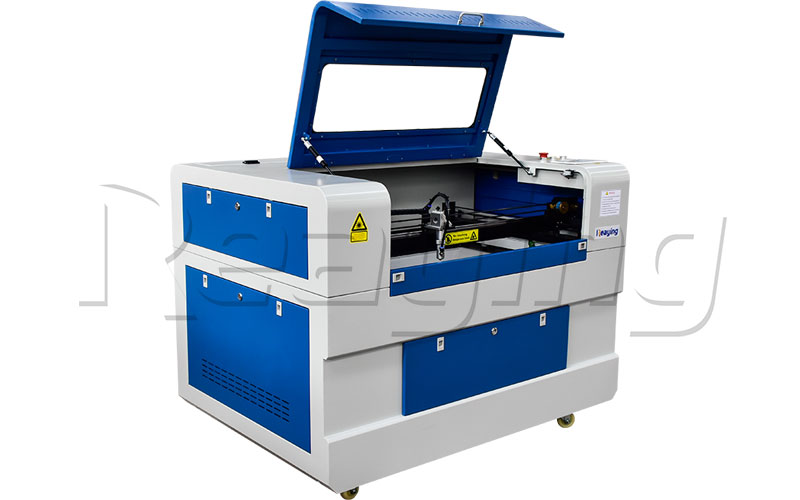
This guide walks through the key factors to consider before buying, what each wattage can handle, and how Reaying’s CO2 models compare.
What to Consider Before Buying
Wattage: The Most Important Number
Wattage determines both engraving depth and cutting thickness. Higher wattage costs more but cuts thicker materials.
| Wattage | Best For | Max Cutting Depth (Acrylic) | Max Cutting Depth (Wood) |
|---|---|---|---|
| 40W | Small craft shops, engraving only | ≤ 2 mm | ≤ 3 mm |
| 60W | Home business, light cutting | ≤ 4 mm | ≤ 5 mm |
| 80W | Small shop, regular cutting | ≤ 6 mm | ≤ 8 mm |
| 100W+ | Production shop, thick material | ≤ 10 mm | ≤ 12 mm |
If you only engrave (not cut), 40–60W is enough. If you cut acrylic signs or wood panels regularly, 80W or higher saves time.
Bed Size
Choose a bed size based on the largest material sheet you typically work with:
- 600×400 mm (6040): small pieces, phone cases, jewelry, craft gifts
- 900×600 mm (9060): signage, medium wood panels, wedding gifts
- 1300×900 mm (1390): full acrylic sheets, furniture panels, large signs
- 1300×2500 mm (1325): full plywood sheets, furniture production
Materials a CO2 Laser Can Process
CO2 lasers work on non-metal materials:
- Wood: plywood, MDF, solid wood, bamboo, cork
- Acrylic: cast acrylic (engraves white), extruded acrylic (cuts flame-polished edges)
- Leather & fabric: genuine leather, faux leather, felt, denim
- Glass: engraves surface (does not cut)
- Paper & cardboard: invitation cards, packaging
- Rubber: stamp making
CO2 lasers cannot cut or engrave metal directly. For metal work, you need a fiber laser machine.
Software
Most CO2 lasers ship with RDWorks. Many buyers upgrade to LightBurn for better design workflow. Check that the machine supports your design software before ordering.
Cooling
- 40–60W machines often use fan or water-cooling
- 80W+ requires a dedicated chiller (CW-5200 is standard)
Ask whether a chiller is included or sold separately.
Engraving vs Cutting: Know the Difference
Engraving marks the surface at high speed with low power. Cutting goes all the way through at lower speed with higher power and air assist.
If you plan to cut, look for:
- Air assist nozzle (clears debris, prevents flame-ups)
- Honeycomb or slat bed (supports material, improves airflow)
- Red dot pointer (aligns the cut path)
Reaying CO2 Laser Models
Reaying offers CO2 engraving and cutting machines for different business sizes:
- L640 Wood Laser Engraving Machine — 600×400 mm bed, suited for small craft businesses and gift shops.
- L960 CO2 Leather Laser Engraving Machine — 900×600 mm bed, popular for leather goods, signage, and medium wood work.
- L1390 Acrylic CO2 Laser Engraving and Cutting Machine — 1300×900 mm bed, designed for acrylic signs and wood panel production.
- L1325S CO2 Laser Engraving and Cutting Machine — 1300×2500 mm bed, for full-sheet plywood and furniture production.
For a machine comparison including power options and bed sizes, contact Reaying with your material and thickness requirements.
Maintenance Basics
A CO2 laser needs regular upkeep to keep output quality stable:
- Clean the lens and mirror every week — see our guide on how to clean the focus lens (the cleaning principle applies to CO2 lenses as well).
- Check the water level and chiller temperature — keep coolant clean and between 18–22°C.
- Empty the exhaust fan and duct — built-up smoke and dust reduce cut quality.
- Check the air assist nozzle — clogs cause uneven cuts and flame marks.
- Replace the CO2 tube every 1–2 years — output gradually drops as the tube ages.
Frequently Asked Questions
How much does a CO2 laser engraving machine cost?
Entry-level 40–60W machines start around $3,000–$8,000. Business-grade 80–100W machines with 1390 beds typically range from $10,000–$20,000. The exact price depends on wattage, bed size, chiller, and rotary attachment.
Can a CO2 laser engrave metal?
No. CO2 lasers reflect off metal surfaces. For metal engraving or cutting, you need a fiber laser marking machine or fiber laser cutting machine.
What’s the difference between a 60W and 100W CO2 laser?
A 60W machine engraves well and cuts up to ~5 mm acrylic. A 100W machine cuts up to 10 mm acrylic or 12 mm wood at roughly twice the speed. If you cut thick materials daily, the 100W pays for itself in time saved.
Do I need a computer with special specs?
No. CO2 laser software runs on a standard Windows PC. A 4GB RAM machine is sufficient. The machine does most of the processing.
How often should I clean the laser lens?
Inspect the lens before each workday. Clean it whenever you see dust, smoke residue, or reduced cut quality. Never rub the lens back and forth — use a single-direction wipe with lens paper and isopropyl alcohol.
Need Help!!!
Categories
Recent Post

Tag Cloud
About Reaying
Shandong Reaying Machinery Co., Ltd. is one of the leading laser machine manufacturers around the world since 2008 with a registered capital of 3 million yuan. It is a high-tech enterprise focusing on R&D...
Read More