How to Increase Laser Engraving Speed: Tips & Safe Upgrades
Laser engraving speed directly affects production output and labor cost. But speeding up engraving is not just about turning up the power — poor adjustments cause blurry edges, uneven depth, and over-burning that creates more rework than it saves.
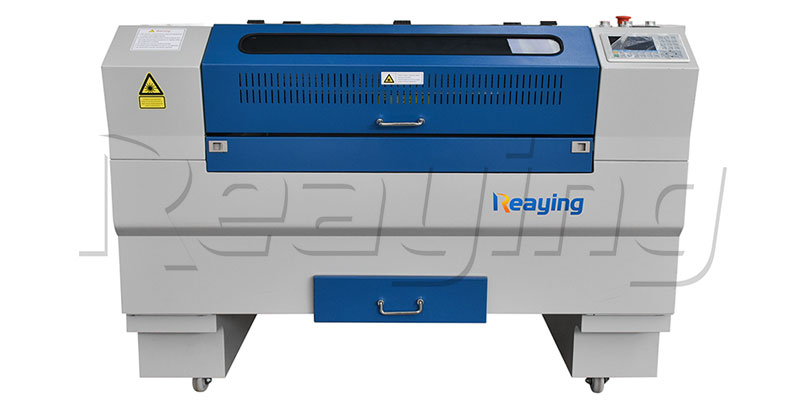
This guide breaks down the practical ways to increase engraving speed on a CO2 or fiber laser machine, what upgrades actually make a difference, and how to keep quality high while going faster.
What Determines Engraving Speed?
Four main factors limit how fast you can engrave:
- Laser power — more power delivers more energy per pulse, allowing faster travel for the same depth
- Material type — soft materials like wood engrave faster than hard materials like stone or glass
- Engraving depth — deep marking requires slower passes or multiple runs
- Motion system — the stepper motors, belts, and rails limit maximum travel speed and acceleration
Method 1: Optimize Engraving Parameters (Free)
This is the first step — most machines are not tuned for maximum speed out of the box.
Adjust Speed vs. Power Ratio
For a given depth, there is an optimal combination of speed and power. Too slow and you waste time; too fast and the mark is faint or uneven.
| Material | 60W CO2 Reference | 80W CO2 Reference |
|---|---|---|
| Plywood engraving (0.2 mm) | 300–400 mm/s, 60% power | 400–500 mm/s, 50% power |
| Acrylic engraving | 200–300 mm/s, 70% power | 300–400 mm/s, 60% power |
| Leather engraving | 400–500 mm/s, 40% power | 500–600 mm/s, 30% power |
Always test on scrap material first. Small increases in speed with matching power adjustments add up over a full production run.
Optimize Scanning Settings
- Increase idle speed — set rapid travel speed between shapes to the maximum your machine can handle accurately
- Use bidirectional scanning — engraves on both left-to-right and right-to-left passes, cutting scan time roughly in half
- Reduce overscan — only use as much overscan as needed for edge quality; extra overscan adds empty travel time
Simplify Graphics Where Possible
- Reduce unnecessary detail in vector files
- Use fewer nodes on curves
- Avoid extremely small text or fine patterns when speed is the priority
Method 2: Upgrade Laser Power (Most Noticeable Gain)
Upgrading from a lower-wattage tube to a higher one is the single biggest speed improvement you can make.
- 40W → 60W: roughly 30–40% faster on most materials
- 60W → 80W: roughly 25–35% faster, plus ability to cut thicker material
- 80W → 100W: roughly 20–30% faster for production cutting and deep engraving
Important: a power upgrade only works if the machine frame, motion system, and cooling can handle the higher output. Upgrading beyond the machine’s original design limit causes accuracy and reliability problems.
Method 3: Improve Optics & Motion
Lens Upgrade
A higher-quality focus lens delivers a tighter, more consistent beam. This means you can run faster and still get clean edges.
- Replace scratched or cloudy lenses immediately
- Upgrade to a ZnSe lens for CO2 machines
- Keep lenses clean — dirty lenses reduce effective power by 20–30%
See our guide on how to clean the focus lens (the same principle applies to CO2 engraving lenses).
Motion System Maintenance
- Clean and lubricate guide rails — sticky rails slow down the carriage and cause uneven speed
- Tighten belts — loose belts cause positioning errors at high speed
- Check stepper motor drivers — upgraded drivers can support higher acceleration rates
Method 4: Software & Workflow Optimization
- Use nesting software — arrange parts to minimize empty travel between engravings
- Batch identical jobs — avoid repeated setup and focusing between identical parts
- Pre-calibrate materials — save tested speed/power presets for each material you use regularly
Common Speed Mistakes to Avoid
- Turning power all the way up — excess power causes burning, melting, and wider heat-affected zones
- Ignoring acceleration — maximum speed number on paper means nothing if the machine never reaches it on small parts
- Skipping maintenance — dirty lenses and dry rails silently reduce speed and quality over time
- Sacrificing quality for speed — blurry or uneven engravings cost more in rework and customer returns than the time saved
When to Consider a New Machine
If you need significantly more speed, upgrading the whole machine is often better than retrofitting an old one:
- If your machine is under 60W and you need production speed → step up to an 80W or 100W CO2 laser machine
- If you are still using a stepper machine → a servo-driven machine delivers much higher acceleration and true production speed
- If you need both engraving and faster cutting → look at a higher-power model with proper cutting air assist
Related Guides
- CO2 Laser Engraving Machine: Buyer’s Guide
- How to Clean the Focus Lens of a Laser Machine
- What Wattage CO2 Laser Do I Need?
Contact Reaying for advice on upgrading your existing machine or sizing a new one for your production speed requirements.
Frequently Asked Questions
How much faster is an 80W laser than a 60W?
Typically 25–35% faster for the same engraving depth and quality. The exact gain depends on material — soft materials like wood see more improvement, hard materials see less.
Can I just increase the speed setting in the software?
You can, but only up to a point. If you go too fast without increasing power, the mark becomes faint and uneven. Always test on scrap and check edge quality.
Does bidirectional engraving reduce quality?
On most machines, no — modern controllers adjust for direction offset. On very fine detail or high-accuracy work, unidirectional may still give slightly cleaner edges.
How often should I clean the lens to keep speed up?
Inspect daily. Clean whenever you see dust, smoke residue, or notice engraving quality drop. A dirty lens can reduce effective power by 20–30%, slowing you down without you noticing.
Is it worth upgrading an old laser machine?
If the frame and motion system are in good shape, yes — a new tube and lenses can give new life. If the machine is small, slow, or worn out, a new machine usually gives better value.
What’s the maximum speed for a CO2 laser engraver?
Typical desktop machines run 200–600 mm/s engraving. Industrial production machines can go 1000+ mm/s, but require servo motion and stable beam delivery.
Need Help!!!
Categories
Recent Post

Tag Cloud
About Reaying
Shandong Reaying Machinery Co., Ltd. is one of the leading laser machine manufacturers around the world since 2008 with a registered capital of 3 million yuan. It is a high-tech enterprise focusing on R&D...
Read More