How to Find the Focus of a Laser Marking Machine Correctly
The focal point of a laser marking machine is the position where the laser beam converges to its smallest, sharpest spot. Correct focus ensures maximum marking depth, clean edges, and consistent quality. If the focus is too high or too low, marks appear blurry, shallow, or uneven across the surface.
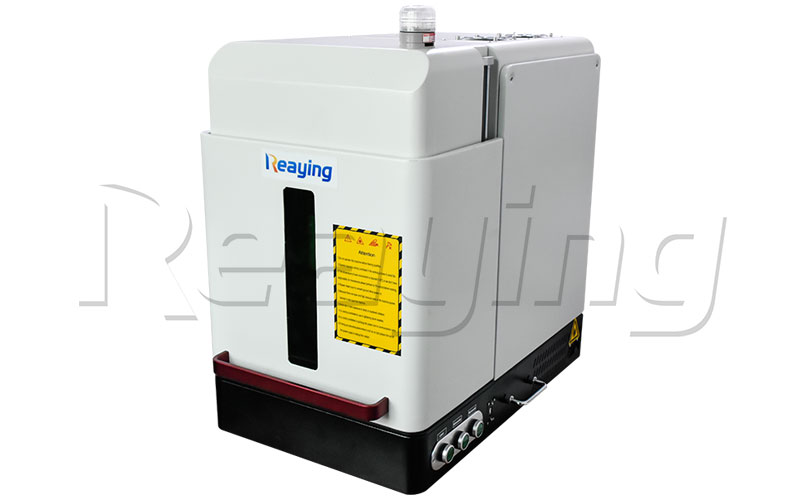
This guide covers 3 reliable methods to find the correct focus, how to verify the result, and common mistakes to avoid.
Tools You Will Need
- Flat metal test piece (stainless steel or aluminum, 1–2 mm thick)
- Marker pen or masking tape
- Feeler gauge (optional, for precision measurement)
- Laser safety glasses (matched to your machine wavelength)
- Z-axis controller or manual lifting platform
Method 1: Step Marking Test (Most Common)
This is the fastest and most widely used method for production machines. You mark a series of lines at different heights and find the sharpest one.
- Set the laser marking software to draw 5–10 parallel lines, spaced evenly across the test piece.
- Load your standard production parameters (power, speed, frequency) for the material you normally mark.
- Start at a height roughly 2–3 mm above your estimated focal point.
- Mark the first line.
- Lower the Z-axis (or raise the worktable) by 0.5 mm and mark the next line.
- Repeat until you have marked 5–10 lines across the estimated focal range.
- Inspect the lines visually. The sharpest, deepest, and most uniform line sits at the correct focal height.
For greater precision, narrow the range and repeat with 0.2 mm steps around the sharpest line from the first pass.
Method 2: Slope / Inclined Plate Test (Most Accurate)
This method uses a slanted surface to map the full focus gradient and find the exact focal plane in one single mark.
- Place a flat metal plate at a 15–30° angle on the worktable, secured so it does not shift.
- Draw a single straight line across the slope in the marking software.
- Mark the line once with standard production parameters.
- The line will be thick and blurry at both ends of the slope, and thinnest at the focal point.
- Measure the height of the thinnest point — that is your exact working distance.
This method is faster than the step test and shows the full focus taper at a glance. It is especially useful when setting up a new machine or installing a new field lens.
Method 3: Red Dot Pointer + Fine Tuning
Most machines include a red dot pointer for rough positioning. Use it to get close quickly, then verify with one of the methods above.
- Turn on the red dot pointer.
- Adjust the Z-axis until the red dot is smallest and sharpest on the workpiece surface.
- Lock the height as a rough starting point.
- Run a step test or slope test to fine-tune the exact focus.
Never rely on the red dot alone — it is only for rough alignment, not for final focus setting.
How to Confirm Correct Focus
A correctly focused laser mark has these characteristics:
- Sharp, clean edges with no blur or halo effect
- Consistent depth across the entire mark
- Bright, uniform contrast on metal surfaces
- No excessive melting or burning around the edges
- Equal quality from the center to the corners of the marking field
If edges are soft or the mark is shallow, the focus is off. If the mark burns and melts the surface, you may be too close or running too much power.
Common Mistakes to Avoid
- Focusing on the worktable, not the workpiece — always set focus to the top surface of your actual production part.
- Skipping fine adjustment — as little as 0.5 mm of focus error causes a visible drop in mark quality.
- Testing with wrong parameters — run the focus test with the same power and speed you use for production.
- Ignoring field curvature — the focal plane can dip slightly at the edges of large marking fields. Verify focus at both center and corners.
- Forgetting to re-focus after lens changes — different focal length lenses have different working distances.
Related Maintenance & Troubleshooting
Correct focus is only part of consistent marking quality. See these guides for more:
- How to Clean the Focus Lens of a Fiber Laser Cutting Machine (the same cleaning principle applies to marking machine lenses)
- The Composition of a Laser Marking Machine
- What Is an Automatic Laser Marking Machine?
Reaying offers replacement focus lenses, field lenses, and full technical support for all its fiber laser marking machines. Contact support for calibration service or spare parts.
Frequently Asked Questions
What is the normal focal distance for a fiber laser marking machine?
Most standard 110×110 mm field lenses have a working distance of about 150–170 mm. Larger fields (200×200 mm, 300×300 mm) have longer focal lengths. Check your lens specification sheet for the exact value.
How do I know if my laser is out of focus?
Marks appear blurry, shallow, or uneven. Edges look soft instead of sharp. You may also notice that mark quality changes noticeably across different parts of the marking field.
Can I run production without focusing?
No. Out-of-focus marks are weak, inconsistent, and can put extra strain on the lens. Always verify focus before running production batches.
How often should I check the focus?
Check focus at the start of each shift, after changing lenses, after cleaning the lens, or whenever mark quality drops. For stable daily production, a quick daily check is usually sufficient.
Does focus affect marking depth?
Yes. Correct focus delivers maximum energy density and maximum depth. Moving even 0.5 mm out of focus can reduce effective depth by 30–50%.
Need Help!!!
Categories
Recent Post


Tag Cloud
About Reaying
Shandong Reaying Machinery Co., Ltd. is one of the leading laser machine manufacturers around the world since 2008 with a registered capital of 3 million yuan. It is a high-tech enterprise focusing on R&D...
Read More