Laser Marking Machine Beam Alignment: Safe Checks and Troubleshooting
A laser marking machine must be correctly focused and configured to produce clear, consistent marks. If the marking position shifts, the result becomes uneven, or the mark appears weaker than expected, the cause may involve focus, workpiece positioning, software settings, optical components, or the laser system itself.
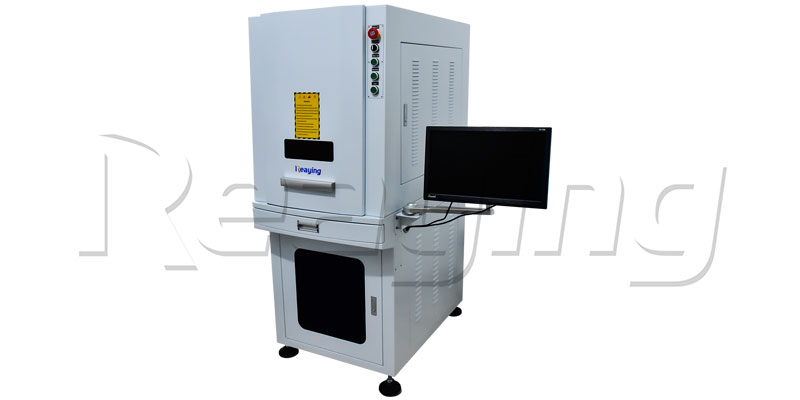
Laser marking machine beam alignment is an important technical topic, but the meaning of alignment varies by machine design. Adjusting the working distance or checking a red positioning guide is not the same as adjusting internal laser optics.
This guide explains the difference, outlines the checks operators can perform according to the manufacturer’s instructions, and identifies situations that require a qualified laser service technician.
What Does Beam Alignment Mean on a Laser Marking Machine?
The term “light path adjustment” is often used to describe several different tasks. Identifying the actual problem is important before attempting any adjustment.
1. Focus and Working Distance
Focus adjustment means positioning the workpiece at the recommended distance from the marking lens so that the laser produces the intended spot size on the surface.
If the focus distance is incorrect, the mark may appear wider, less distinct, or inconsistent. The correct working distance depends on the installed field lens and the machine configuration.
Many marking machines provide a focus ruler, a mechanical height adjustment, a focus gauge, or a red-light focusing system. Use the method specified in the equipment manual.
2. Red-Light Positioning and Preview
Some laser marking machines use a visible red guide to help operators position a workpiece or check the marking area.
The red guide is not necessarily the same optical source as the marking laser. A difference between the visible guide and the final mark may involve guide alignment, software settings, the galvo scanning system, the lens configuration, or another machine-specific issue.
Do not assume that moving an internal optical component is the correct solution. First identify the type of alignment system described in the manual.
3. Galvo Scanner and Field Lens
Many laser marking machines use a galvanometer scanner to direct the beam across a marking area. A field lens focuses the beam over the specified working field.
Marking that is distorted, displaced, or inconsistent across the work area may require evaluation of the software calibration, field lens, galvo system, or other components.
These checks can involve specialized equipment and procedures. Internal optical adjustments should only be performed by qualified personnel following the manufacturer’s service instructions.
4. Internal Laser Optical Alignment
Some laser systems contain internal optical components that require specific alignment procedures. The components and adjustment methods differ among laser sources and machine designs.
An older laser system that uses a Q-switch or frequency-doubling crystal, for example, may require a very different service procedure from a modern fiber laser marking machine.
Never apply adjustment steps from one laser model to another without confirming that they are explicitly approved for that equipment.
Common Signs of a Laser Marking Alignment or Focus Problem
The appearance of a mark can help identify what to check next, but a single symptom does not prove that the optical path is misaligned.
Blurry or Weak Marking
Possible causes include incorrect focus, unsuitable marking parameters, an incompatible material, contamination on an optical surface, or a problem with the laser source.
Start by confirming the workpiece position, the recommended focus distance, and the parameters approved for the material. If the result remains abnormal, stop and arrange a technical inspection.
Marking Position Does Not Match the Preview
If the final mark does not appear where the software preview indicates, check the design origin, workpiece positioning, fixture, and applicable software settings.
If the mismatch persists across known-good settings and correctly positioned samples, the red guide, galvo calibration, or other machine components may need inspection.
Inconsistent Marking Across the Work Area
If marks appear different at various positions within the working field, potential causes include focus variation, lens condition, field calibration, workpiece flatness, and machine configuration.
Record where the problem occurs and provide the information to the supplier or service technician. Do not adjust internal optics simply because the mark is uneven.
Marking Quality Suddenly Changes
A sudden change can be related to a parameter change, a different material batch, a focus-height change, contamination, a loose fixture, or a machine fault.
Compare the current result with a previously successful sample under the same verified conditions. If the problem remains unexplained, stop operation and request technical support.
Safe Checks Before Requesting Laser Marking Machine Service
The following checks focus on the work setup and documented operator adjustments. They are not instructions for opening the machine or aligning internal laser optics.
Step 1: Review the Machine Manual and Safety Instructions
Confirm the machine type, laser source, installed lens, and approved operating procedure.
Follow all laser safety labels and the manufacturer’s instructions. Do not bypass safety interlocks, open protective covers while the system is enabled, or look into the beam path.
If the required procedure involves internal optics, the laser source, Q-switch components, electrical systems, or a normally enclosed beam path, refer the work to qualified service personnel.
Step 2: Check the Workpiece and Fixture
Make sure the workpiece is secure, properly positioned, and presented at a consistent height.
An uneven surface, tilted workpiece, loose fixture, or incorrect starting position can make the mark appear displaced or inconsistent even when the optical system is functioning normally.
For repeated production, use an appropriate fixture or positioning system to help maintain consistent workpiece placement.
Step 3: Confirm the Recommended Focus Distance
Use the manufacturer’s specified focusing method to set the correct working distance.
Do not guess the focus height based solely on the appearance of the red guide. A visible pointer is a positioning aid, and its relationship to the actual marking spot depends on the machine design.
If you cannot establish focus using the documented operator procedure, contact the supplier before proceeding.
Step 4: Verify the Design and Marking Parameters
Check the file dimensions, marking origin, object position, and software settings.
If possible, compare the setup with a previously successful job using the same material and machine configuration. Confirm that any parameter changes were intentional.
Avoid making several adjustments at once. Changing many settings simultaneously makes it harder to identify the cause of a problem.
Step 5: Inspect Accessible Components Only as Directed
Dust, contamination, or damage affecting an optical component can influence marking quality. However, optical surfaces are sensitive and should only be cleaned using the method and materials approved by the manufacturer.
Follow the required shutdown procedure before any permitted maintenance. Do not touch optical surfaces, remove protective windows, or dismantle optical assemblies unless you are authorized and trained to do so.
If an optical surface appears damaged or contaminated beyond routine approved maintenance, request a professional inspection.
Step 6: Document the Result
Record the material, workpiece position, lens configuration, software settings, visible symptom, and when the problem first appeared.
Photographs of the workpiece and the affected marking area can help a technician understand the issue.
Useful records can also show whether the fault occurs across all jobs or only with a particular material, file, or workpiece position.
When Should You Contact a Laser Service Technician?
Stop troubleshooting and request qualified service if any of the following occurs:
- The procedure requires opening the laser source or removing protective covers.
- The manual calls for adjustment of internal mirrors, a Q-switch, a frequency-doubling crystal, or other laser-source components.
- The machine shows electrical faults, cooling problems, interlock errors, unusual sounds, or signs of optical damage.
- The red guide and actual marking remain significantly misaligned after the documented operator checks.
- Marking quality changes unexpectedly and cannot be explained by the material, focus, workpiece position, or verified parameters.
- The recommended procedure requires optical measurement equipment or a service-level calibration.
Industrial laser alignment can present serious hazards, especially when protective enclosures are opened or the beam path becomes accessible. Alignment work must follow the equipment-specific service procedure and appropriate laser safety controls. OSHA identifies alignment tasks as an area requiring particular caution.
How Laser Marking Machine Design Affects Adjustment
Not every laser marking machine uses the same optical arrangement. Understanding the machine type helps determine which checks are appropriate.
Fiber Laser Marking Machines
Fiber laser markers commonly use a laser source, a beam-delivery fiber, a galvo scanner, and a field lens. Depending on the model, operator adjustments may focus on working distance, workpiece positioning, and documented software settings rather than manual alignment of a free-space mirror path.
Explore Reaying’s fiber laser marking machine F20A to review an enclosed desktop marking system, or browse the complete laser marking machine range.
CO2 Laser Marking Machines
CO2 laser marking machines are used for selected non-metal materials. Their optical arrangements and maintenance requirements can differ from fiber systems.
If you use a CO2 machine, follow the service instructions for its particular laser source and optical configuration. Do not transfer mirror-alignment steps from another machine model without confirmation.
See Reaying’s CO2 laser marking machine for non-metal materials for an example of this equipment type.
UV Laser Marking Machines
UV marking equipment is used for selected applications requiring fine marking or processing of suitable heat-sensitive materials. The correct focus, lens configuration, and operating procedure depend on the particular machine.
Refer to the appropriate manual when checking focus or marking position. Do not assume that a UV, CO2, and fiber machine use identical optical adjustment procedures.
Reaying also offers a high-precision UV laser marking machine.
Maintenance Practices That Help Maintain Marking Consistency
Routine maintenance can reduce avoidable setup problems and help identify changes before they affect a large production batch.
- Keep the work area clean. Dust and debris on the workpiece or fixture can affect positioning and marking consistency.
- Use approved lens-maintenance procedures. Only clean accessible optical components when the manufacturer’s instructions permit it.
- Check workpiece positioning. A consistent fixture and working height help reduce variation between parts.
- Keep a record of successful settings. Record the material, lens configuration, focus method, and verified parameters for repeat jobs.
- Review changes after maintenance. If marking quality changes after moving equipment or replacing a component, follow the approved verification procedure before resuming normal production.
- Arrange service when needed. Internal optical alignment, source-level repair, and calibration outside the operator procedure should be handled by qualified technicians.
Frequently Asked Questions
Can I adjust the light path of a laser marking machine myself?
You may be able to adjust the working distance, focus height, or other operator-accessible settings if the manufacturer’s manual explicitly permits it. Internal optical alignment and laser-source adjustments are different tasks and should be performed only by qualified personnel following the correct service procedure.
Why does the red guide not match the final laser mark?
The red guide may not share the same optical path as the marking beam. The discrepancy could involve the guide alignment, software settings, workpiece positioning, galvo calibration, or lens configuration. Check the approved setup procedure before deciding what needs adjustment.
Does every laser marking machine require light path adjustment?
No. The adjustment and calibration requirements depend on the laser source, optical design, and machine configuration. Some routine issues can be addressed through documented focus or positioning checks, while internal optical alignment may require professional service.
Can incorrect focus cause blurry marks?
Yes. Incorrect working distance can affect marking clarity and spot size. However, weak or blurry marks may also result from material differences, unsuitable parameters, optical contamination, or a system fault.
How often should a laser marking machine be aligned?
There is no single interval suitable for all laser marking machines. Follow the manufacturer’s maintenance schedule and arrange inspection when symptoms, service work, equipment movement, or calibration checks indicate that it is needed.
What information should I provide when requesting technical support?
Provide the machine model, laser type, lens configuration, material, working distance, verified settings, description of the symptom, and photographs of the affected marks. Also mention any recent maintenance or changes to the setup.
Need Help With Your Laser Marking Machine?
The right troubleshooting method depends on the machine’s laser source, optical design, and the symptom you observe. Identifying whether the issue relates to focus, positioning, software settings, or internal optics can help avoid unnecessary adjustments.
Reaying offers fiber, CO2, and UV laser marking equipment for different industrial applications. Visit the Reaying laser marking machine range to explore available systems.
For technical support, provide your machine model, a description of the marking problem, the material being processed, and representative photos. Follow the manufacturer’s safety instructions and do not attempt internal laser alignment unless you are qualified and authorized to perform the specified procedure.
Need Help!!!
Categories
Recent Post

Tag Cloud
About Reaying
Shandong Reaying Machinery Co., Ltd. is one of the leading laser machine manufacturers around the world since 2008 with a registered capital of 3 million yuan. It is a high-tech enterprise focusing on R&D...
Read More