Laser Cutting Machine Maintenance: Complete Checklist & Schedule
Regular maintenance extends the service life of a fiber laser cutting machine, maintains consistent cut quality, reduces unplanned downtime, and lowers long-term operating cost. Most production failures do not happen suddenly — they build up slowly from skipped cleaning, worn parts, and overlooked checks.
This guide provides a full maintenance schedule organized by frequency, step-by-step procedures for each system, common mistakes to avoid, and how to link maintenance issues to cut quality problems.
Full Maintenance Schedule
Daily Checks (Before Each Shift)
Complete these in 5–10 minutes before starting production:
- Inspect the protective lens for dust, smudges, and burn spots; clean or replace if needed
- Check the chiller water level and top up with distilled or deionized water if low
- Verify assist gas pressure (nitrogen / oxygen / compressed air) matches the day’s material
- Clear cutting slag and debris from the workbed and slats
- Check the red dot pointer alignment and confirm focus height
- Inspect the nozzle for spatter buildup or damage; clean or replace as needed
Weekly Maintenance
- Clean the guide rails and apply a thin layer of lubricating oil
- Clean the rack and pinion and re-lubricate
- Drain water from the air filter and regulator
- Inspect the dust extraction system and clean the primary filter
- Wipe down the machine exterior and control cabinet to remove metal dust
Monthly Maintenance
- Check belt tension on the X and Y axes; adjust if loose
- Drain and refill the chiller with fresh distilled water
- Inspect all electrical connections for looseness or overheating signs
- Tighten all mounting screws on the cutting head, lens holder, and workbed
- Verify machine grounding continuity for operator safety
Quarterly Maintenance
- Replace the protective lens if showing signs of wear (even if not visibly damaged)
- Clean or replace the dust collector filter cartridge
- Calibrate the optical path to ensure beam centering through the nozzle
- Inspect the gearbox and top up lubricant if required
- Test emergency stop, door interlock, and other safety functions
Annual / Major Service
- Full optical system inspection: focus lens, collimator, beam delivery mirrors
- Complete motion system calibration: straightness, perpendicularity, repeatability
- Replace worn belts, bearings, and nozzles
- Full electrical system inspection and contact cleaning
- Laser source output power test and internal cleaning
System-by-System Maintenance Guide
1. Optical System (Most Critical)
The optical system directly determines cut quality and is the most sensitive to contamination.
- Protective lens: Inspect daily. Clean with 99%+ isopropyl alcohol and lint-free lens paper using a single-direction wipe. Never touch the surface with bare fingers.
- Focus lens / collimator: Inspect monthly. Handle only by the edges. Replace if scratches, burn spots, or film buildup appear.
- Nozzle: Clean spatter daily. A damaged or misaligned nozzle causes gas turbulence and poor cut edge quality.
Full step-by-step guide: How to Clean the Focus Lens of a Fiber Laser Cutting Machine
2. Motion & Transmission System
Worn or dry motion parts cause positioning errors, rough cut edges, and premature mechanical failure.
- Keep guide rails and racks clean of metal dust and debris
- Lubricate with the manufacturer-recommended oil on schedule
- Check belt tension monthly — too loose causes positioning error; too short causes premature wear
- Listen for unusual grinding or squeaking sounds during operation; these are early warning signs
3. Cooling System
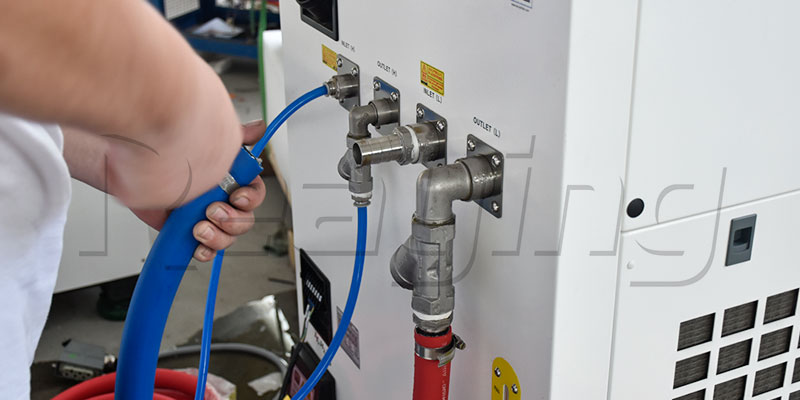
Overheating damages the laser source and optics. Cooling problems are the #1 cause of expensive laser failures.
- Use only distilled or deionized water — tap water causes mineral scale inside the laser cavity
- Change water completely every 1–3 months depending on environment
- Clean the chiller filter and heat exchanger monthly
- Maintain coolant temperature between 20–25°C
- Never run the machine with the chiller turned off
4. Gas & Dust Extraction System
- Check gas line connections for leaks with soapy water monthly
- Replace gas filter elements on schedule
- Clean dust extraction ducts and filters regularly; accumulated metal dust is a fire hazard
- Ensure exhaust flow matches cutting parameters for best edge quality
5. Electrical System
- Keep the control cabinet doors closed to keep out metal dust
- Blow out dust with low-pressure dry air every quarter
- Tighten terminal connections annually
- Ensure the machine has a dedicated, properly grounded power supply
Common Maintenance Mistakes to Avoid
- Using regular paper or cloth to clean lenses — scratches the optical coating permanently
- Skipping daily lens checks — a single dirty lens can cost hours of bad parts and downtime
- Using tap water in the chiller — mineral buildup destroys the laser source over time
- Over-lubricating rails — excess oil attracts dust and causes abrasive wear
- Ignoring small warning signs — unusual noises, slight quality drops, and slow positioning all precede major failures
When Cut Quality Drops: Check These First
If you notice burrs, rough edges, or incomplete cuts, go through this list before changing parameters:
- Is the protective lens clean?
- Is the nozzle clean and centered?
- Is focus height correct?
- Is gas pressure at the correct level?
- Is the chiller temperature stable?
Most sudden quality drops are maintenance issues, not parameter issues.
Related troubleshooting guides:
Reaying Maintenance Support & Spare Parts
Reaying supplies genuine spare parts, maintenance kits, and on-site service for all its fiber laser cutting machines. Common wear parts — protective lenses, nozzles, filters, and belts — are kept in stock for fast shipment.
Frequently Asked Questions
How often should I maintain my laser cutting machine? Daily checks take 5–10 minutes per shift. Weekly maintenance takes 30–60 minutes. Full service is performed quarterly and annually. Sticking to the schedule prevents 80% of common breakdowns.
What happens if I don’t maintain my laser cutter? Skipped maintenance leads to progressively worse cut quality, more scrap parts, premature wear on motion parts, and — in the worst case — permanent damage to the laser source from overheating or contaminated optics.
Can I use tap water in the chiller? No. Tap water contains minerals that form scale inside the laser cooling circuit, reducing cooling efficiency and causing permanent laser damage. Always use distilled or deionized water.
How long does a protective lens last? With daily cleaning and normal production use, a protective lens typically lasts 1–3 months. Heavier cutting, dusty environments, and oily materials shorten life. Replace immediately if you see burn spots.
How do I know if my machine needs professional service? Call for service if you notice: sudden power loss, persistent cut quality issues after all basic checks, unusual grinding noises from motion axes, or repeated overheating alarms.
Can I do maintenance myself? Daily, weekly, and monthly checks can be done by your in-house operator. Optical path calibration, power testing, and internal laser service should be performed by trained technicians.
Need Help!!!
Categories
Recent Post

Tag Cloud
About Reaying
Shandong Reaying Machinery Co., Ltd. is one of the leading laser machine manufacturers around the world since 2008 with a registered capital of 3 million yuan. It is a high-tech enterprise focusing on R&D...
Read More